
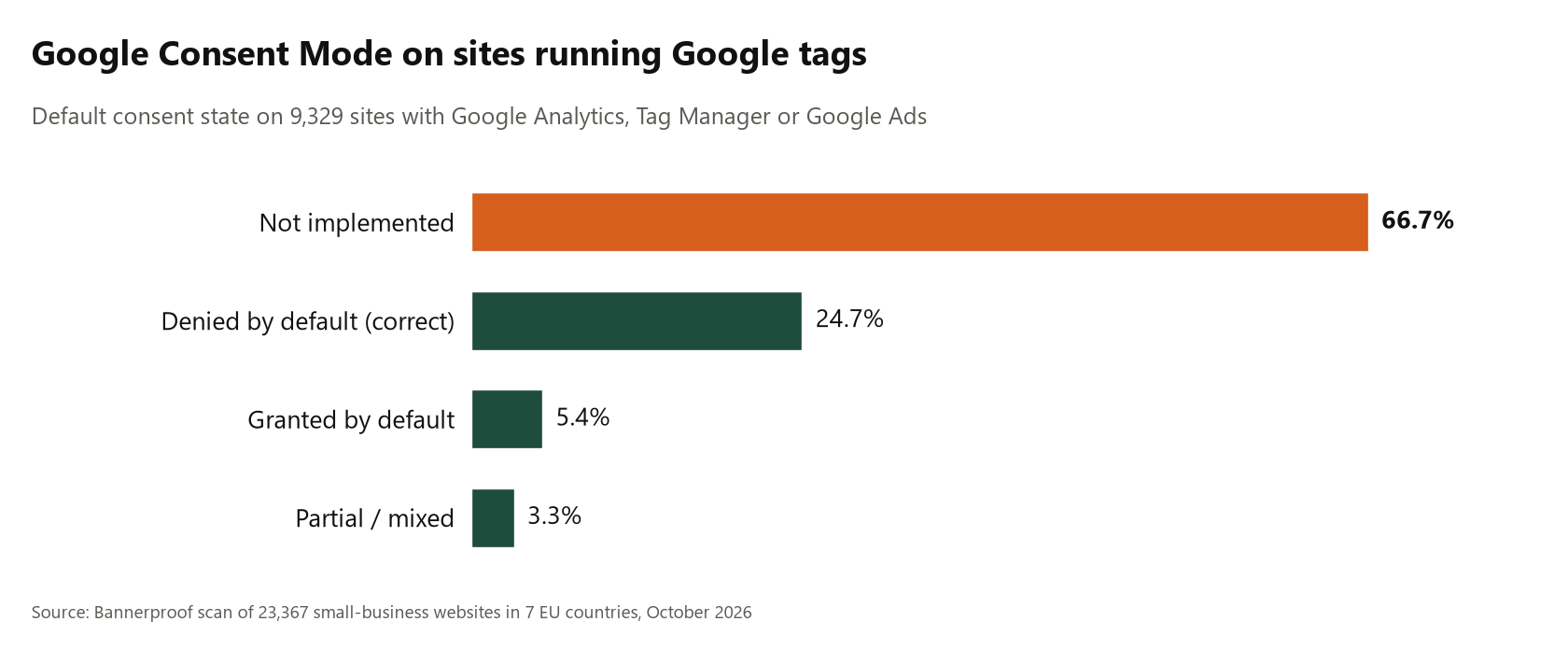
Google has required Consent Mode v2 for advertisers in the European Economic Area since March 2024. In our October 2026 scan of small-business websites in seven EU countries, 9,329 sites ran Google Analytics, Google Tag Manager or Google Ads. Two thirds of them (66.7%, or 6,219 sites) sent no Consent Mode signal at all.
This post is part of our small-business cookie consent study. Here we look only at how Google's own consent signal is set up, and where it goes wrong.
What Consent Mode does
Consent Mode is how a website tells Google's tags what the visitor agreed to. Version 2 uses four parameters:
ad_storage: may advertising cookies be stored?analytics_storage: may analytics cookies be stored?ad_user_data: may user data be sent to Google for advertising?ad_personalization: may the data be used for personalized ads and remarketing?
The correct pattern is default denied, then update on consent. The page sets all four to denied before any Google tag runs, and the consent tool switches them to granted only when the visitor accepts.
The four states we found
Among the 9,329 sites with Google tags:
- Not implemented: 66.7% (6,219 sites). No consent default at all.
- Denied by default (correct): 24.7% (2,301 sites).
- Granted by default: 5.4% (505 sites). Ad and analytics storage were already granted before any choice.
- Partial or mixed: 3.3% (304 sites), for example analytics granted and ads denied.
Why "granted by default" is worse than nothing
A site with no Consent Mode is silent. A site that sets granted by default actively tells Google the visitor agreed, before they have seen a banner. Of the 505 granted-by-default sites, 353 showed no banner at all, and 412 were running Google Ads.
Google Ads with no signal
4,309 sites fired Google Ads before consent. 3,002 of them (69.7%) sent no Consent Mode signal at all. Among sites with Google tags and no banner, 75.3% had no Consent Mode either.
Platforms decide a lot
The platform a site runs on strongly shaped the result:
- Wix: 86.1% denied by default (251 sites), and none granted by default.
- WordPress: 76.1% not implemented (5,174 sites), 19.5% denied, 2.5% granted.
- Squarespace: 71.0% not implemented and 25.3% partial (162 sites).
- Shopify: 59.2% granted by default (453 sites).
- PrestaShop: 4.6% granted (151 sites). Webflow: 1.5% granted (130 sites).
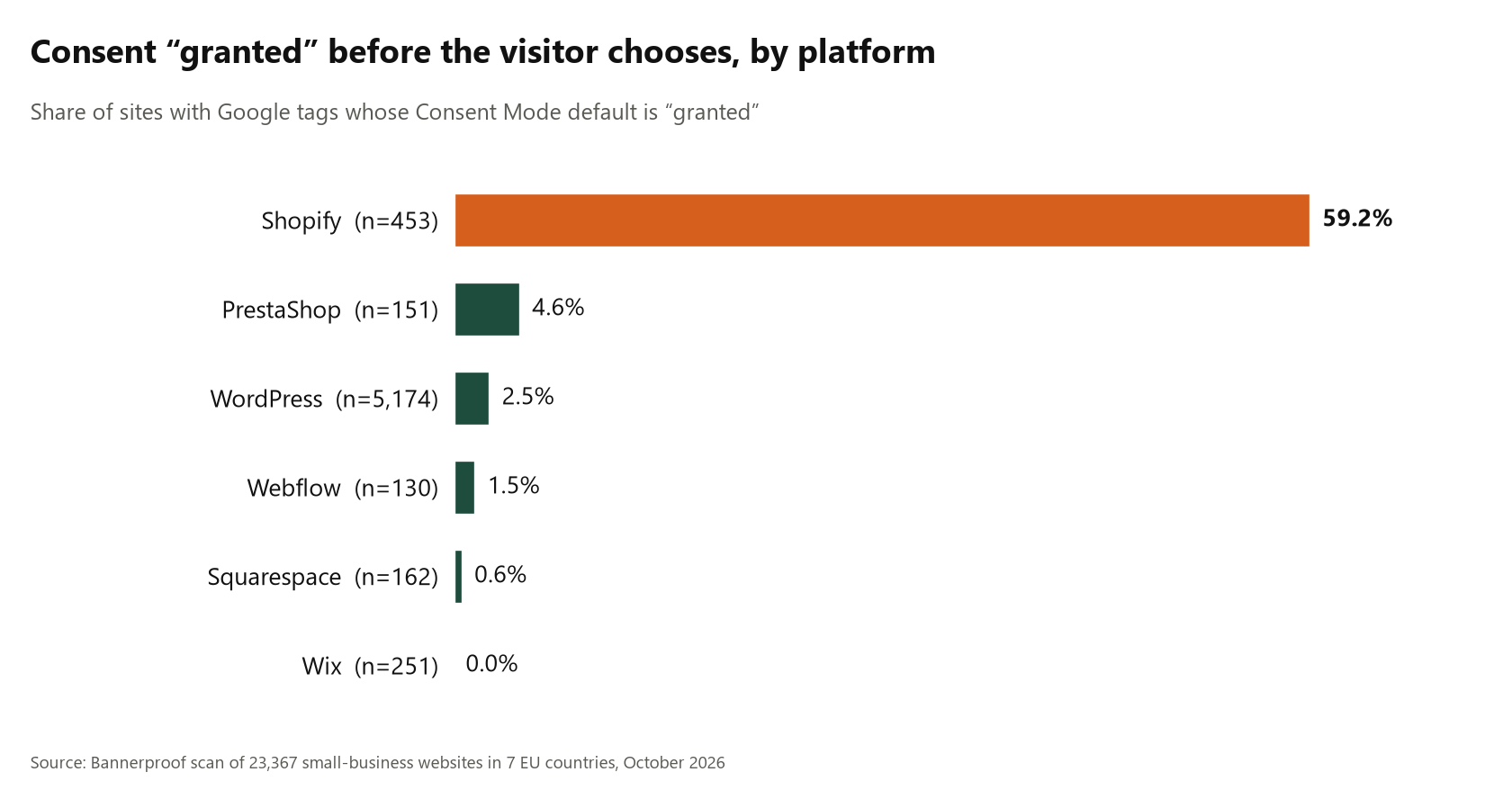
The Shopify figure stands out. In our scan from an EU IP, most Shopify stores with Google tags reported consent as granted before any choice. This is likely a store or app default that treats consent as granted when the store's own consent settings and region are not configured for the EU. If you run a Shopify store, our Shopify cookie consent guide is a good place to start.
WordPress shows the opposite problem: most sites never add Consent Mode at all.
Country differences
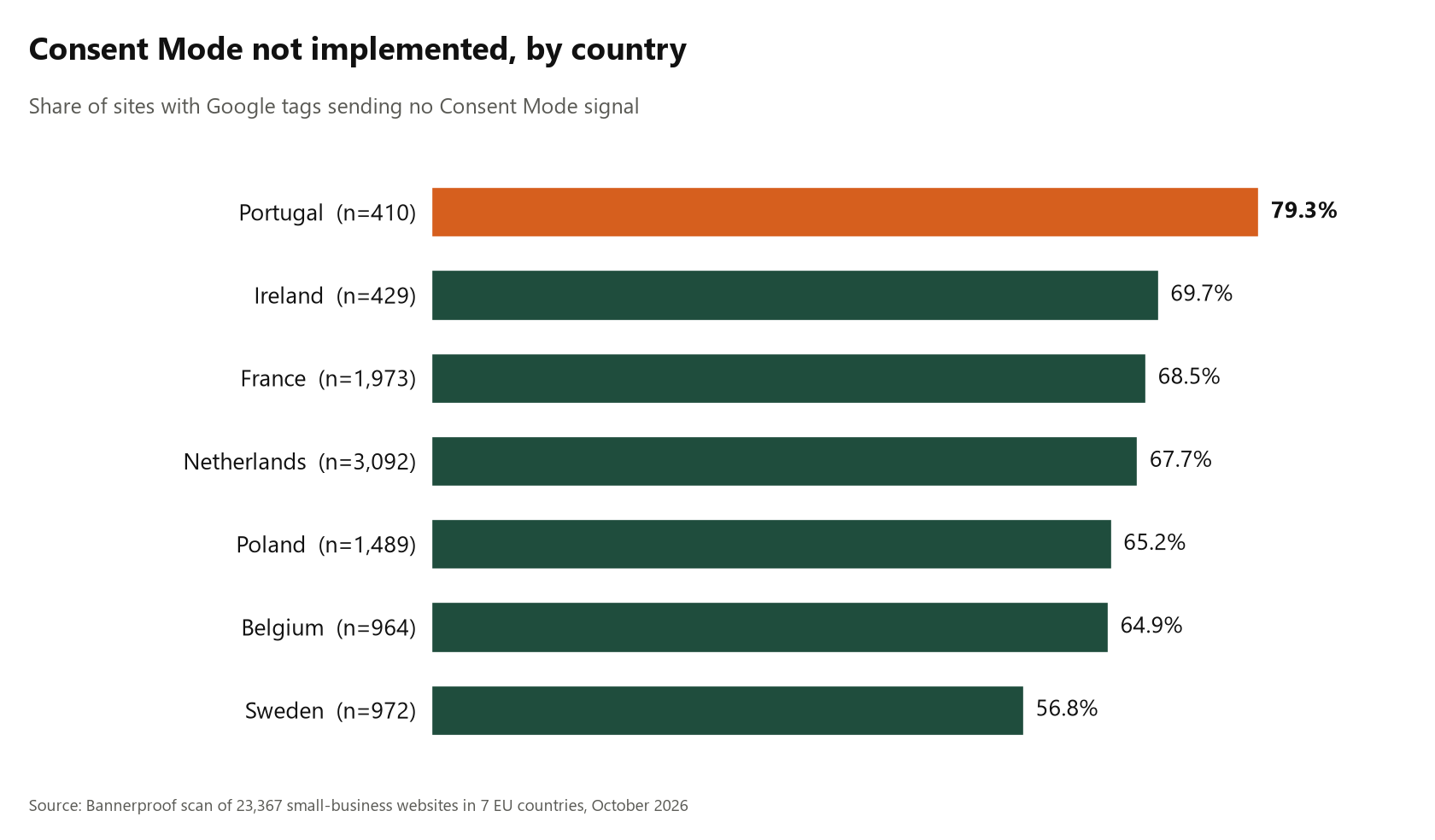
The share of Google-tag sites with no Consent Mode was highest in Portugal (79.3%), followed by Ireland (69.7%), France (68.5%), the Netherlands (67.7%), Poland (65.2%) and Belgium (64.9%). Sweden was lowest at 56.8%, and also had the highest share of correct denied-by-default setups, at 35.4%.
Consent tools help, but configuration decides
Sites using a dedicated consent tool were more likely to send a Consent Mode signal than sites with no banner, but results varied widely by tool and configuration. More on that in CMP vs. Manual Cookie Banners.
The business cost
In the EEA, Google's conversion modelling and remarketing audiences depend on Consent Mode. Without it, or with the wrong defaults, advertisers lose measurement and build audiences on signals that were never real consent.
How to check your own site
- Open your site in a private window and do not touch the banner.
- Open DevTools, go to the Console, type
dataLayerand press Enter. - Look for an entry with
consentanddefault. All four parameters should bedenied. - Accept the banner, run
dataLayeragain, and look for aconsentupdatewithgranted.
Google Tag Assistant shows the same in a friendlier view. More in Google Consent Mode v2: What It Actually Checks.
How to fix it
- Not implemented: enable Consent Mode v2 in your consent tool or add a default
deniedcommand before your Google tags load. - Granted by default: find what sets it, usually a platform, app or template setting, and switch the default to
deniedfor EEA visitors. - Partial: make sure all four parameters are set, not only the storage ones.
Methodology in brief
We took 37,814 small-business domains from the website links on public Instagram business profiles in seven EU countries and scanned them on 24 October 2026 with a real Chromium browser and a clean profile, from EU IPs. 23,367 loaded and were analyzed. We loaded the homepage without interaction and recorded every request and cookie. The sample is not random, server-side tagging is invisible to a browser, and this is not a legal assessment of any site.
See what your site tells Google
Run a free Bannerproof scan to check what loads before consent on your site and whether your setup holds up after Reject.